Showing posts with label Holly Bunny. Show all posts

Wednesday, August 2, 2017

Designers Choice challenge- Movies-


Hi everyone, today at The House that Stamps built for Repeat Impressions stamps Cheri is challenging everyone to make a card using a Movie as inspiration.

Of Course, my card is inspired by "Bambi"


Bambi, Thumper and Flower

Repeat Impressions stamps used

Challenges
Crafty Catz #381 ATG not a card (3/3)
Simply papercraft #49 ATG (3/3)
Crafting from the Heart #170 ATG (2/3)
Dream Valley #160 ATG 10C (2/3)
OLLCB #234 ATG 
Pammies Inky Pinkies 1731 ATG (2/3)
Lemon Shortbread #47 ATG (1/3)
DL Art August linky party

Off to Terre Haute today with my Mom,Sister and niece!

Wednesday, November 30, 2016

Through the Craft Room November Blog Hop- 2 year Celebration

Good morning Friends and Followers! Welcome to my post for the 2nd Annual Celebration Blog Hop for Through the Craft Room Door which will run until midnight November 30th with winners announced December 5th! 
2 year Celebration at TTCRD in Nov.
If you came here from Cecilia's blog you are on the right trail! If not, click HERE to head on over to Through the Craft Room Door to read the requirements and start the hop! 

We have quite a few prizes up for grabs from some very generous sponsors, blog candy on several of the Design Team Members blogs, including mine, a freebie digi paper for everyone who leaves a comment on the main blog post.
 There will be a drawing from TTCRD and our TTCRD Facebook page.

We have some awesome sponsors with some awesome prizes

Prize: 3 digital paper sets

Prize: Two $10 Vouchers

Prize: Two $20 Vouchers


Prize: 3 items from her shop

Prize: 3 digital images

Prize: $7 Voucher

Prize: $25 Gift voucher

Prize: $20 Gift Voucher

Prize: $15 Gift Voucher

Prize: $25 Voucher, U.S. only

Prize: 3 images from the shop

I have a bag flip to share with all of you today using Repeat Impressions Stamps.


Thanks for stopping by ... Don't forget to leave a comment for a chance to win one of the main prizes and also the bag flip above with some surprise crafty goodness inside. I'm sorry, But United States Residents only please for Candy. 

Now on to your next stop which is Digistamps4joy - Guest Blog. Don't forget to leave some love ... if you comment on all the blogs as you visit, you get more chances in the drawing! 

TTCRD  Blog Hop


d
also
eU.S. Residents only please for my blog candy


Monday, December 21, 2015

My Project of the week for Repeat Impressions- A Window Slider card!!!

Hi Everyone, Deonna Here, bringing you my project of the week for The House that Stamps Built. One of my "Rock Star" sisters , Kathy, encouraged me to show how to make a Window Slider Card, so here goes. 

Window Slider Card


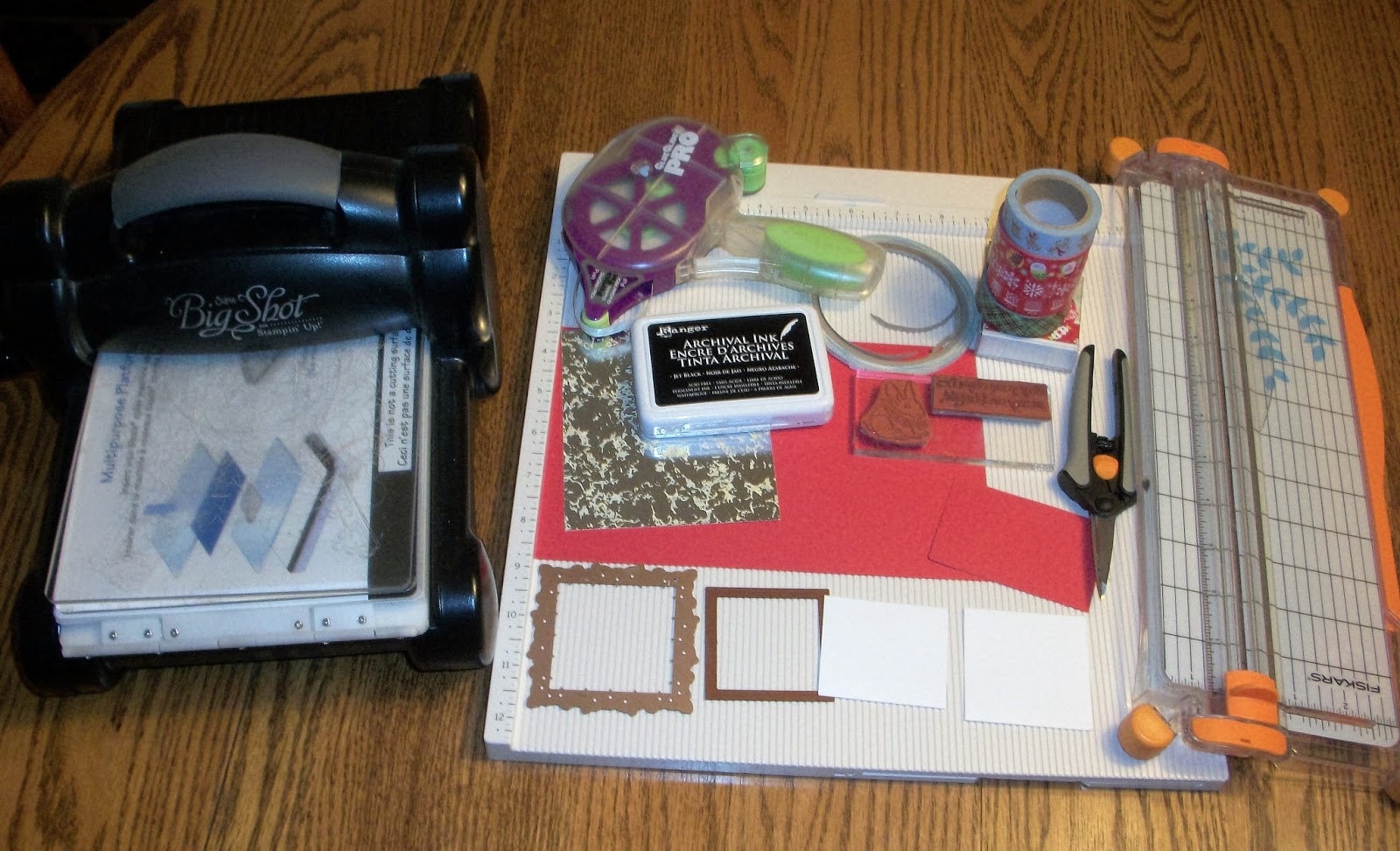
Supplies:

3" Decorative Square Die- Mine is Spellbinders 
2" square die or punch
Red and White Cardstock Cut and scored as follows:
 5 1/2" x 8 1/2" Base card-(Mine is Red) Score at 4 1/4" and fold in half
Base Mat- 5 1/4" x 4" Silver Cardstock
1 Piece of White Cardstock cut to 2 1/4" x 2"- Score the 2 1/4" side at 1/8", 1-1/8" and 2-1/8"
2" x 2" Square of White cardstock to stamp image on
1 pc. 2" x 3" piece of Red Cardstock
Score Board or tool
1/8" Scor-tape
Sizzix Big Shot or other die cut machine
Washi Tape- Crafters Square is mine
Black Archival ink- Ranger
Repeat Impressions Stamps- 1020-G, Holly Bunny and 2219-G, May your days...


1. Cut the cardstock to the measurements above and score your lines if needed. Die Cut your Decorative framed square and the center with your 2" x 2" Spellbinders die. Shown here.


2.  Stamp your Holly Bunny stamp onto your White 2" x 2" square using Black Archival ink. Set aside or Color.


3.  Fold your base Card in half on the score line and Glue your Silver base mat to the front of your card base. Make sure that you center it to leave a 1/8" red border around the card.

4.  Lay your Decorative Square frame where desired on your silver base mat. DO NOT GLUE DOWN! Put glue on the backside of your 2" x 2" Stamped image and center inside the Red Frame. You may then remove the red frame from your card and put together your Window as follows


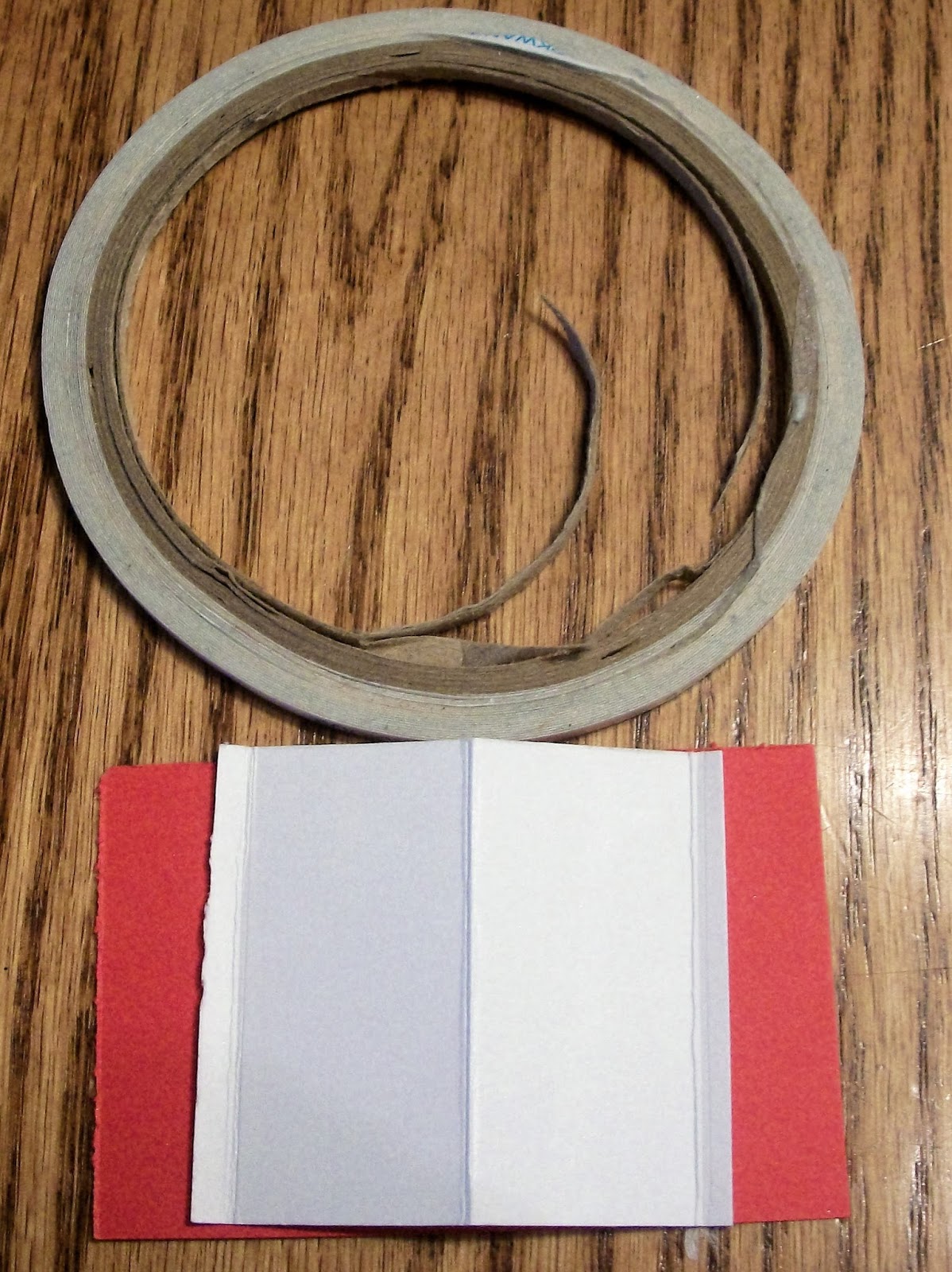
5.  Fold your piece of White Cardstock that Measures 2-1/4"x 2" on your previously scored lines. The Center line should be Mountain folded and then the  1/8" sections should be valley folded. See


6.  Still using your 2-1/4" x 2" piece, apply 1/8" Scor tape to the right hand front 1/8" scored  section. Flip over and place scor-tape on the left 1/8" scored section. 


7. Remove tape backing of the front Right piece, attach underneath of the inside of the Red Decorative frame (Right side)Remove the paper Backing of your scor-tape on the left side, back section and attach to the edge of your Red 2" x 3" section. (Left Side) You should now have your completed Slider piece ready to adhere around your White 2"x 2" Stamped Square.


8. Now starting at the bottom edge of your white 2" x 2" square attach strips of washi tape.  I used 4 pieces of washi tape slightly overlapped with a notch cut from the bottom. 


9. Attach your slider piece  over your stamped image by adding 1/8" Scor-tape to the top and the bottom of your Red Decorative square piece on the back side and then lining up over your White Stamped Piece and adhering with the tape. 


10. Stamp your sentiment if desired and your card is complete. 


Ho, Ho Ho!!! Merry Christmas!

Challenges

Fussy And Fancy #154 Happy Holidays
PDE Linky #102 Anything goes
Simply Papercrafts #20 Anything goes (3/3)
Crafty girls Creations #11 Anything goes (3/3)
Not Just Cards #27 Anything goes
Card and Scrap #108 Anything goes
Glitter n Sparkle #167 Traditional or not
Crafty Friends #21 Anything goes
My Time To Craft Last Minute Christmas
Di's Digi Designs Anything Christmas (1/3)
Sweet Stampin Merry Christmas (1/2)
Pattie's Creations #117 Anything Christmas (1/2)
QKR Stampede #170 Christmas (1/4)
613 Avenue #155 Anything Goes (1/3)
Come and Get it Merry Christmas (UL)
Lil Patch of Crafty Friends #24 Anything goes (1/3)


I hope that you were inspired to give this tutorial a try.